

Most contractors end up looking at HubSpot for the same reasons. The spreadsheet has stopped working, follow-up is slipping, and HubSpot is the CRM everyone has heard of. It’s affordable, it’s easy to use, and it isn’t built for construction. So the real question is whether a general-purpose CRM can handle the way work gets won in this industry.
It can, and for a lot of contractors it’s the right call, with two conditions.
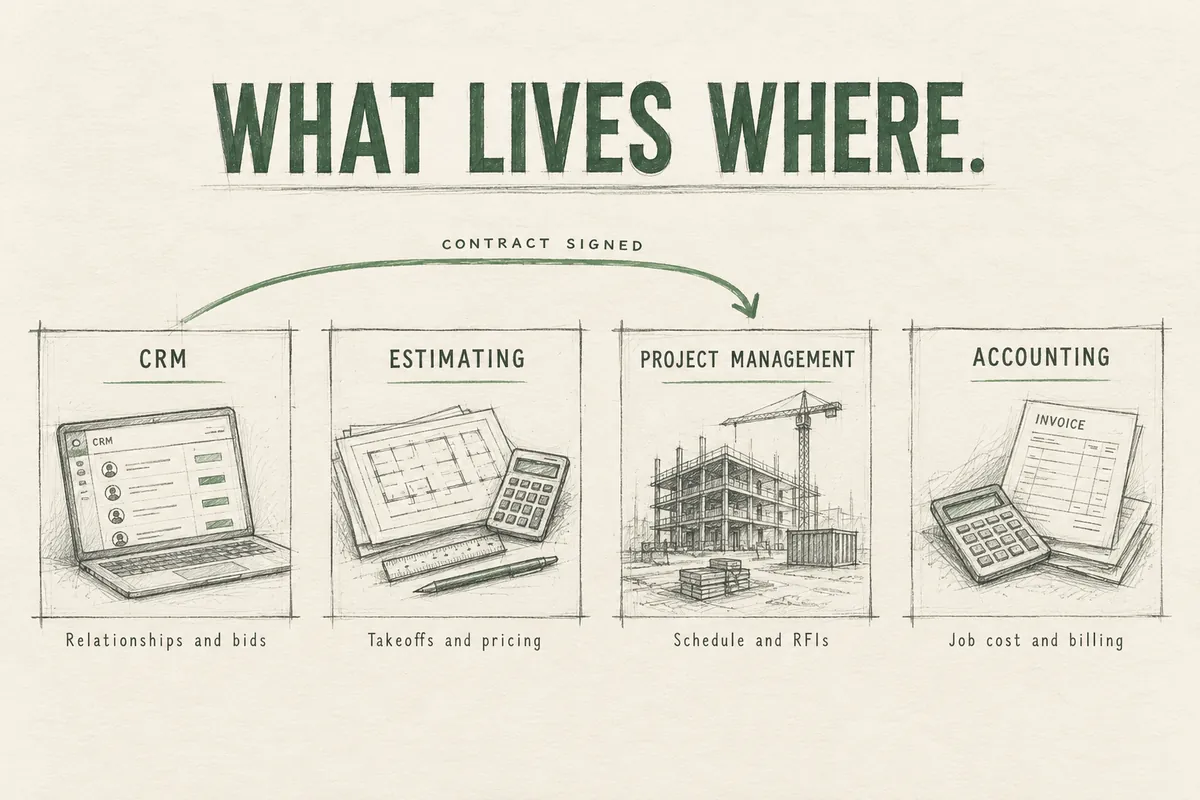
The first is that you use it for what it’s built for, which is the sales and relationship side of the business. It will track who you know, what you’re chasing, what you’ve bid, and who hasn’t heard from you in six months. It will not run your jobs.
The second is that you set it up for construction. HubSpot is built to work for almost any kind of business, which means it shows up knowing nothing about bids, GCs, or how a project gets awarded. The default pipeline and fields are generic. Contractors who turn it on, import a contact list, and leave the default pipeline in place usually end up three months later with a CRM only the owner opens and the real pipeline back in a spreadsheet.
We run our own pipeline in HubSpot and we set it up for contractors, so we like the tool. (If you’re still deciding whether you need a CRM at all, start with our guide to CRM in the construction industry.) It’s relatively cheap, it’s easy to use, and you can start simple and keep growing into it for years without ever having to move to another platform. We also know where it falls short, and where the costs can sneak up on you. This guide covers both: what it’s good at, what it isn’t, who should buy something else, what it really costs, and how to set it up so your team uses it.
The quick verdict
| Best for | Contractors who want an easy, affordable CRM for business development, bid tracking, and follow-up, and who may want email marketing and website lead capture in the same system later |
| Not for | Anyone expecting estimating, job costing, scheduling, or project management. Also not ideal if you want construction logic ready on day one with no configuration |
| Cost | Free to start. Most contractors land on Starter (roughly $10 to $20 per user per month) or Professional (about $90 to $100 per user per month plus onboarding) |
| Biggest strength | Cost and scalability. You can start for very little and never outgrow it |
| Biggest weakness | It knows nothing about construction until you teach it, and it does so much that it can feel overwhelming until you pare it down |
| Watch out for | Features that quietly require a jump to Professional, where the price climbs fast |
| Setup time | About 30 days to do it properly |
What HubSpot does well for contractors
It’s cheap to start. The free and Starter plans let you begin without a big decision or a long contract. For what a small team pays, you get a lot of CRM.
It grows with you. Together with the cost, this is the biggest reason to start here. When you’re ready to build a real marketing effort, with email campaigns, automated follow-up, and website forms that drop inquiries straight into the pipeline, it’s the same system and the same data. A contractor who starts on HubSpot with three users will most likely never have to migrate to another platform, no matter how big the company gets. Most construction-specific CRMs don’t have that marketing side.
It’s easy to use. The people you need in the CRM (estimators, PMs, the owner) did not sign up to do data entry. If the tool is clunky, it’s dead within a month. HubSpot is easier to pick up than most business software.
Email logs itself. The Outlook and Gmail extensions attach conversations to the right contact and deal without anyone typing notes. For most estimators, that removes the bulk of the data entry.
The mobile app is good. Half of relationship building in this industry happens at a site walk, a pre-bid meeting, or an industry event. Scanning a business card and adding a two-line note from the parking lot is the difference between remembering a conversation and losing it.
It’s flexible. Custom pipelines, custom fields, and custom reports mean you can make it match how you win work, whether that’s residential estimates or commercial hard bids.
You can make it simple. HubSpot does a lot, and most contractors don’t need most of it. You can hide the parts you don’t use, trim the menus and record layouts down to what matters, and end up with a system that does the handful of things you need at a pretty good cost.
Where HubSpot falls short
It doesn’t run jobs. No takeoffs, no estimating, no job costing, no scheduling, no submittals, RFIs, or change orders. That work belongs in your estimating software, your project management platform (Procore, Buildertrend, JobTread, whatever you run), and your accounting system.
HubSpot added a Projects feature in late 2025, available on every plan. It gives you task lists, a board view, and a timeline tied to a deal. It’s fine for a handoff checklist or a closeout process. It has no budget tracking, no cost tracking, and no resource planning, so don’t mistake it for construction project management.
Nothing about it is construction-specific. A construction-built CRM comes with bid tracking, go/no-go scoring, and project fields already in place. HubSpot comes with stages like “Appointment Scheduled” and “Decision Maker Bought-In.” Everything construction-related, you build.
There’s no Procore connector made by HubSpot. The options are third-party connectors or automation tools like Zapier. They work, but they cost extra, so price them before you assume the systems will talk.
It can be overwhelming. The flip side of all those features is that a new user logs in and sees marketing tools, service tools, sequences, playbooks, workflows, and a dozen other things they’ll never touch. Most contractors don’t need the advanced features, and nobody tells you which ones to ignore. Without someone deciding what to use and what to leave alone, people get lost and stop logging in.
Costs jump between plans. Starter is cheap. Professional is roughly ten times the per-user price plus a one-time onboarding fee. Some features contractors end up wanting, like labeled relationships between a deal and multiple companies, sit on Professional. A true custom “Project” or “Bid” record type sits on Enterprise.
Proposal and resume tools aren’t there. If your marketing team builds SOQs, RFP responses, and project sheets, construction-built CRMs often store project history and staff resumes for that purpose. HubSpot doesn’t.
Who should choose HubSpot, and who shouldn’t
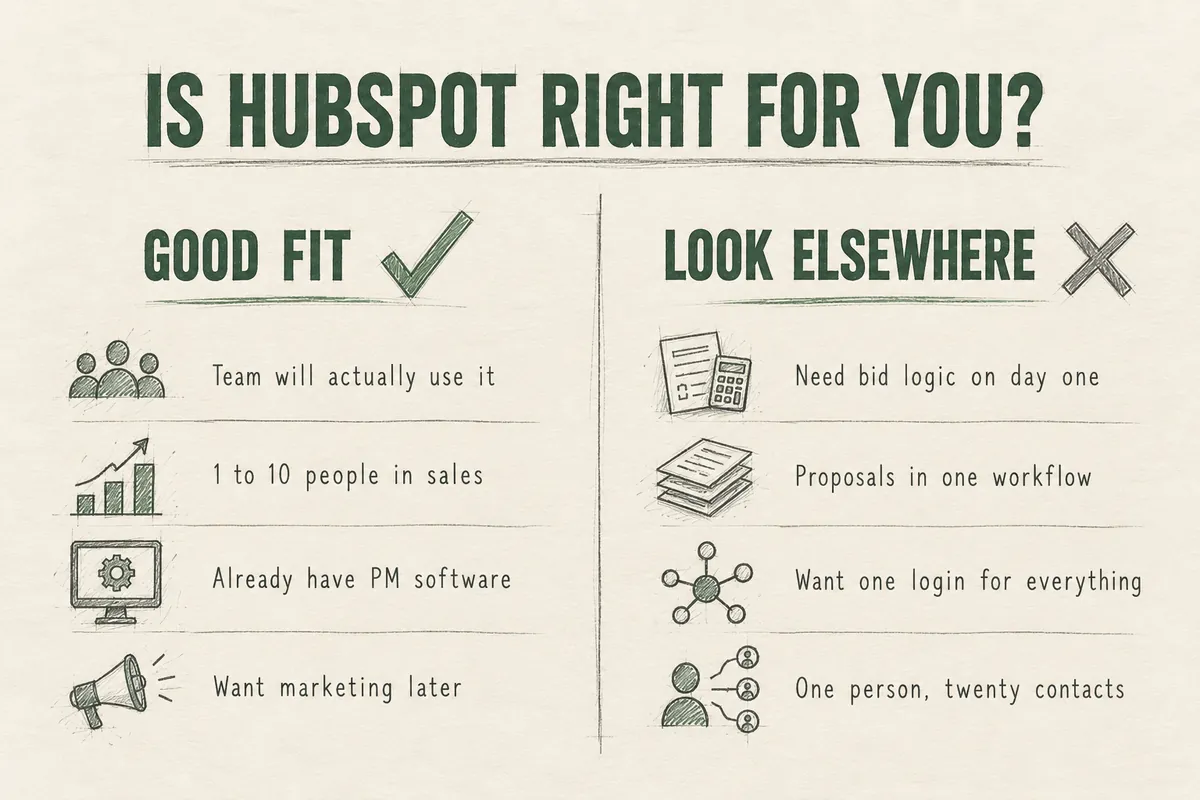
HubSpot is a good fit if:
- You want a CRM your team will actually open, and adoption has killed past attempts
- You have one to ten people touching sales, estimating, or business development
- You already have project management and accounting software you’re happy with
- You want marketing (email, website forms, lead tracking) in the same place eventually
- You’re willing to spend a month setting it up properly, or have someone do it
Look elsewhere if:
- Your top need is bid tracking, go/no-go scoring, and pursuit management built for commercial work with no configuration
- Your marketing team wants pursuits, project history, and staff resumes feeding proposals in one workflow. You can run proposals alongside HubSpot, but it won’t be one system
- You’re a residential builder or remodeler who wants CRM, estimating, and project management under one login
- You have one person doing sales and twenty relationships. A well-kept spreadsheet is honestly fine for now. A CRM pays off when more than one person touches the pipeline or follow-up has started slipping
One more case. If you already own a CRM nobody uses, switching platforms probably won’t fix it. The problem is usually the setup and the habits, and those follow you to whatever you buy next.
HubSpot alternatives worth a look
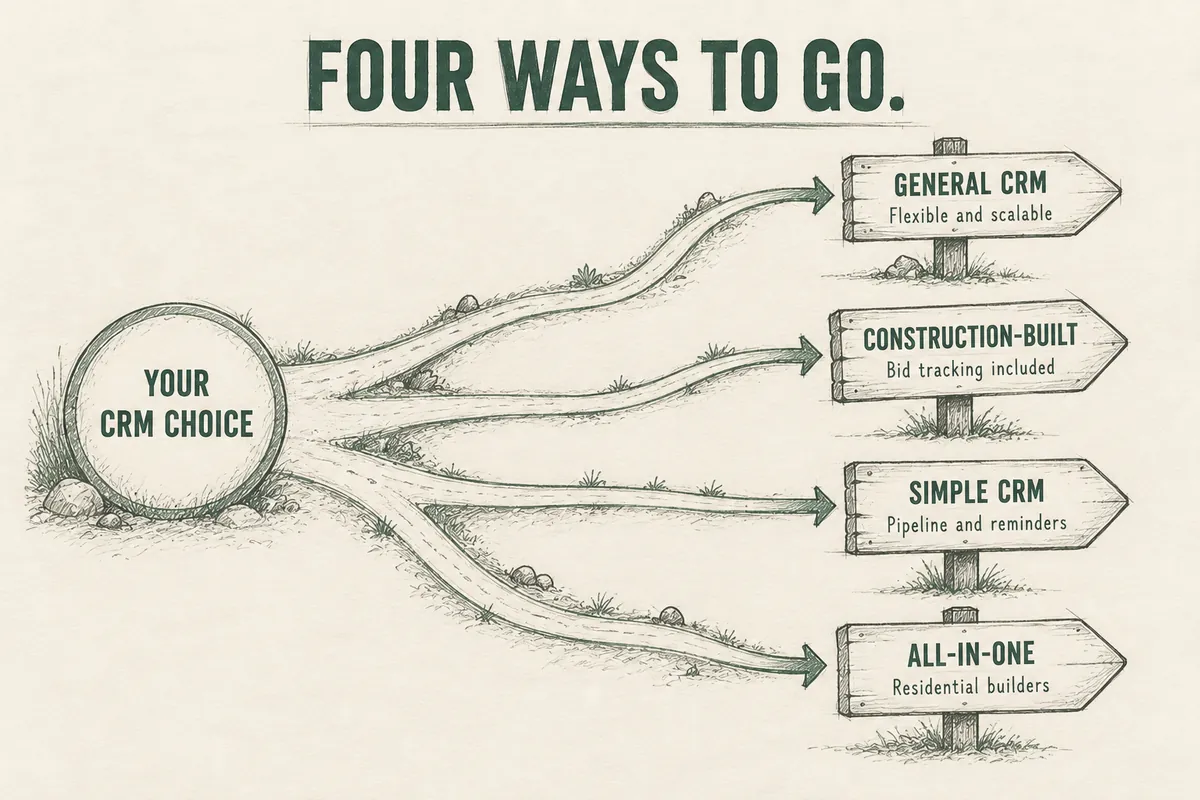
If you read the last section and landed in “look elsewhere,” these are the realistic options. They fall into three groups.
CRMs built for commercial construction
These come with pursuits, bid tracking, and go/no-go decisions in place on day one. You give up HubSpot’s marketing side and some flexibility.
ProjectMark. Built for commercial contractors, with relationship and opportunity tracking, forecasting, an Outlook plugin, a mobile app, and contact data enrichment included. Integrations with Procore, Vista, and BuildingConnected are available as add-ons. Plans are sized by team (up to 6 users, up to 10, and 10+), implementation is included, and pricing is by quote. Full disclosure: ProjectMark is a partner of ours.
Unanet CRM (formerly Cosential). The long-standing choice for larger GCs and architecture and engineering firms. Its strength is tying CRM to proposal generation, with project history and staff resumes stored for SOQs and RFP responses. It’s heavier to implement and makes the most sense when you have a marketing department that lives in proposals.
General-purpose CRMs
Same category as HubSpot: not built for construction, flexible enough to configure.
Pipedrive. A simple, pipeline-first sales CRM. Plans run about $14 to $79 per user per month. If all you want is a visual board of deals and reminders to follow up, it’s lighter and cheaper than HubSpot Professional. It has far less on the marketing and reporting side.
GoHighLevel. Flat monthly pricing (plans start around $97 a month) with unlimited users, and strong text message and automated follow-up tools. It fits contractors with a high volume of inbound leads, which usually means residential and service work. It’s less suited to long commercial pursuits with multiple companies on one project.
All-in-one platforms
Buildertrend and JobTread. Built mainly for residential builders and remodelers. They combine lead tracking, estimating, scheduling, and client communication under one login. The CRM piece is lighter than a dedicated CRM, but you avoid stitching systems together.
How they compare
| HubSpot | Construction-built CRM | Pipedrive / GoHighLevel | All-in-one platform | |
|---|---|---|---|---|
| Ease of use | High | Medium | High | Medium |
| Construction logic on day one | No | Yes | No | Yes (residential) |
| Marketing tools | Strong | Limited | Limited / Strong | Limited |
| Project management | No | No | No | Yes |
| Proposal and resume support | No | Often | No | No |
| Cost to start | Free or low | Quote-based | Low | Mid |
| Best fit | BD-focused contractor who wants flexibility | Commercial GC or sub with formal pursuits | Small team that wants simple | Residential builder or remodeler |
Which HubSpot plan a contractor actually needs
Prices change, so check HubSpot’s pricing page before you buy. As of this writing:
Free. Up to two users. Fine for an owner who wants to get contacts and a basic pipeline out of their head. You’ll outgrow it quickly.
Starter. Roughly $10 to $20 per user per month depending on how you pay. Two pipelines, basic automation, no HubSpot branding on your emails. This is the right plan for most contractors with one to five people in the CRM. A lot of companies should stay here for a year before thinking about more.
Professional. About $90 to $100 per user per month, plus a one-time onboarding fee around $1,500. This is where you get real automation, automated follow-up sequences, labeled associations, custom reporting, forecasting, and up to 15 pipelines. Worth it when you have a dedicated BD person or a sales team, or when you want follow-up to run without someone remembering it.
Enterprise. Around $150 per user per month with a larger onboarding fee. The main reason a contractor would care is custom objects, which let you build a true “Project” or “Bid” record separate from deals. Very few contractors need it.
Budget separately for any connector to your project management software, and for setup help if you don’t want to build it yourself.
The mistake we see most often is buying Professional on day one because the demo looked good, then using ten percent of it. Start lower. Upgrade when you hit a wall you can name.
The second mistake is drifting into an upgrade. HubSpot shows you features from higher plans inside the product, usually with a small lock icon or an “upgrade” button. It’s easy to start a trial of one, build a process around it, and then find out you need Professional to keep it. Before you rely on any feature, check which plan it lives on. Most of what a contractor needs (pipelines, custom fields, email logging, the mobile app, tasks, basic reports) is on Free or Starter.
If you go with HubSpot: how to set it up for construction
The rest of this guide is the setup. This is where HubSpot either becomes useful or becomes shelfware.
Decide what you’ll use HubSpot for, and what you won’t
Do this before you touch the software. HubSpot can do far more than you need, so the first job is drawing the line.
Make two lists. On the first, what HubSpot owns. For most contractors that’s contacts and companies, the pursuit and bid pipeline, follow-up tasks, and email logging. Marketing email and website forms can come later. On the second, what stays where it is: estimating, project management, accounting, document storage.
Then turn off or ignore everything that isn’t on the first list. If you aren’t using the service tools, the marketing tools, or sequences yet, take them out of people’s view. A system that does five things well gets used. One that shows forty options gets avoided.
Work out which integrations you need
Next, list the places HubSpot has to connect to, and decide which of those connections are worth building now.
- Email and calendar (Outlook or Gmail). Always. This is what makes logging automatic.
- Your website forms. Almost always. Inquiries should land in the pipeline, not in someone’s inbox.
- Project management (Procore, Buildertrend, and so on). Only if retyping won jobs is a real burden. At ten awards a year, creating the job by hand takes minutes. At a hundred, a connector pays for itself.
- Accounting. Rarely needed at the start.
- Bid platforms and lead sources. Usually a manual step or a simple import. Don’t over-engineer it.
If you don’t already have one of those systems in place, that’s a separate decision. Don’t let it hold up getting the CRM running.
Build the pipeline around how you win work
In HubSpot, a “deal” is one opportunity to win one job. Name every deal with the project and location, like “Riverside Medical Office TI, Tampa,” so anyone can read the board at a glance.
Delete the default stages. What replaces them depends on how you sell.
If you sell direct to the customer (residential builders and remodelers, service contractors, design-build firms working straight with an owner), the cycle runs days to a few months and one person usually decides:
- New Inquiry
- Qualified
- Site Visit Scheduled
- Estimate in Progress
- Estimate Sent
- Negotiation
- Signed
- Lost
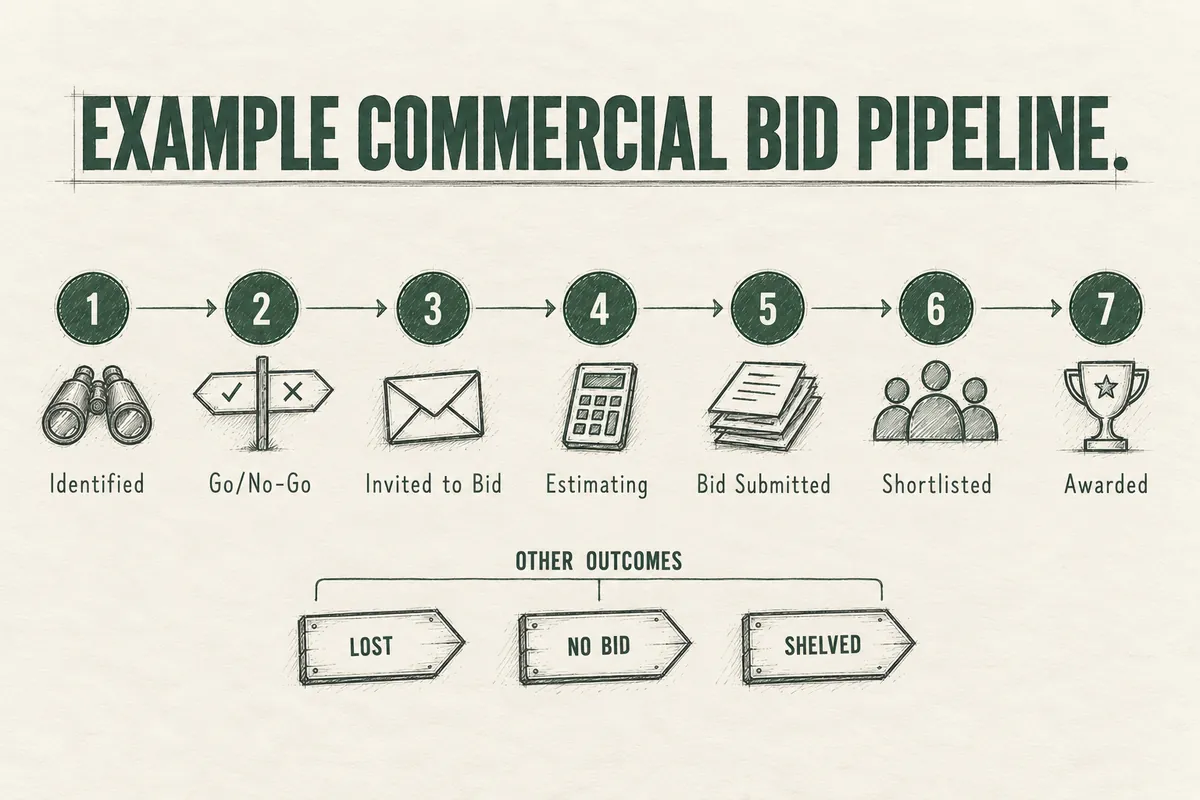
If you bid commercial work, cycles run six to eighteen months. You often hear about a project long before there’s anything to price, and the decision involves an owner, an architect, an owner’s rep, and sometimes a GC sitting between you and all of them:
- Identified (you know the project exists)
- Go / No-Go (you’ve decided it’s worth pursuing)
- Invited to Bid or RFP Received
- Estimating
- Bid Submitted
- Shortlisted / Negotiating
- Awarded
- Lost
- No Bid
- Project Shelved
Those last three matter. Most setups lump them into “Lost,” and that wrecks your numbers. If you passed on a project, that isn’t a loss. If the owner’s financing fell through, that isn’t a loss either. Mix them together and your hit rate looks worse than it is, and nobody trusts the report.
The second pipeline most commercial contractors are missing
In commercial work, most projects are won well before bid day. You have to be on the bid list to get the invite, and the contractors who already have a relationship with the owner or GC tend to get the last look, the negotiated work, and the benefit of the doubt. Getting prequalified with a GC or becoming a developer’s go-to can take a year of lunches, site visits, and small jobs.

If the only thing in your CRM is active bids, all of that relationship work is invisible. So build a second pipeline for target accounts:
- Target
- First Conversation
- Capabilities Sent / Prequal Submitted
- On the Bid List
- First Invite
- First Award
Now when someone asks how business development is going, there’s an answer that doesn’t depend on whether a bid happened to land this month. Starter gives you two pipelines, which is exactly enough for this.
One project, four GCs
Every subcontractor runs into this. You’re bidding one project to four different GCs. Is that one deal or four?
Make it one deal per project. Associate all four GCs to it, and record which one you were awarded through. If you create four deals at $800K each, your forecast says $3.2M for a job that can only ever be worth $800K, and your pipeline total becomes fiction. On Professional you can label those associations (“Bidding GC,” “Awarded GC,” “Architect,” “Owner”) so the deal record shows everyone involved in the project.
The fields worth tracking
The temptation is to add forty custom fields on day one. Don’t. Every field you add is a field someone has to fill in, and an estimator with three bids due this week will fill in none of them.
Start with these on the deal:
| Property | Type | Why it earns its spot |
|---|---|---|
| Project type / market | Dropdown (healthcare, retail, multifamily, office TI, etc.) | Shows where you actually win |
| Project location | Text or dropdown | Hit rate by geography |
| Estimated value | Currency (HubSpot’s Amount field) | Forecasting |
| Bid due date | Date | Drives reminders; separate from close date |
| Expected award date | Date (use HubSpot’s Close Date) | Forecast timing |
| Delivery method | Dropdown (hard bid, negotiated, design-build) | Negotiated work usually wins at a very different rate |
| Lead source | Dropdown | Referral, repeat client, bid site, outreach, website |
| Estimator | User | Workload and hit rate by person |
| Loss reason | Dropdown | Price, relationship, scope, schedule, other |
One detail people get wrong: the bid due date and the close date are not the same thing. The close date should be when you expect the award, which can be weeks or months after you submit. If you set it to the bid date, every forecast you pull will be early.
On the company record, add one field for company type (owner, developer, GC, architect, property manager, subcontractor, supplier) and one for relationship status. That’s enough to segment by later.
Make a handful of these required when a deal is created or moved to a stage. Five required fields is about the limit before people start typing junk to get past the form.
Getting your team to actually use it
CRMs die at construction companies for a simple reason. The people with the information are not salespeople, don’t think of themselves as salespeople, and see the CRM as paperwork. Training won’t fix that. Making the CRM the path of least resistance will.
Run your pipeline meeting from the HubSpot screen. Put the deal board on the conference room TV every week. If a pursuit isn’t on the board, it doesn’t get discussed. This does more for adoption than anything else, because it makes the CRM the place where work gets attention.

Let email do the logging. Install the Outlook or Gmail extension for everyone on day one.
Put the mobile app on the phones of whoever goes to events and site walks. The details from a conversation are gone by the next morning.
Give one person ownership. Someone has to clean up duplicates, chase missing fields, and keep stages honest. At a small company that’s often the office manager or a marketing coordinator. If it’s nobody’s job, it doesn’t happen.
Have the owner use it in front of people. If the owner asks “what’s the status on the Riverside bid” in the hallway, the team learns the CRM is optional. If the owner pulls it up and asks why the record is empty, they learn the opposite.
The reports that pay for the whole thing
Once three to six months of clean data are in, HubSpot starts telling you things most contractors are guessing at.
Hit rate by client. Many contractors have a GC or owner they’ve bid a dozen times and never won with. Usually they’re being used as a check number. Each of those bids costs real estimating hours. The report makes it obvious, and it gives you grounds to either have a direct conversation with that client or stop bidding them.
Hit rate by project type and size. You may win one in three medical office jobs and one in fifteen ground-up retail jobs. That should change what you chase.
Hit rate by lead source. Referral and repeat work almost always wins at a much higher rate than cold bid-site invites. Seeing your own numbers side by side is what finally convinces people to invest in relationships.
Pipeline by expected award month. This is your early warning on a backlog gap. If the quarter after next looks thin, you want to know now, while there’s still time to do something about it.
Accounts with no contact in 90 days. Past clients and bid-list relationships go quiet without anyone deciding to let them. A saved view of who hasn’t heard from you is the cheapest business development tool you’ll ever build.
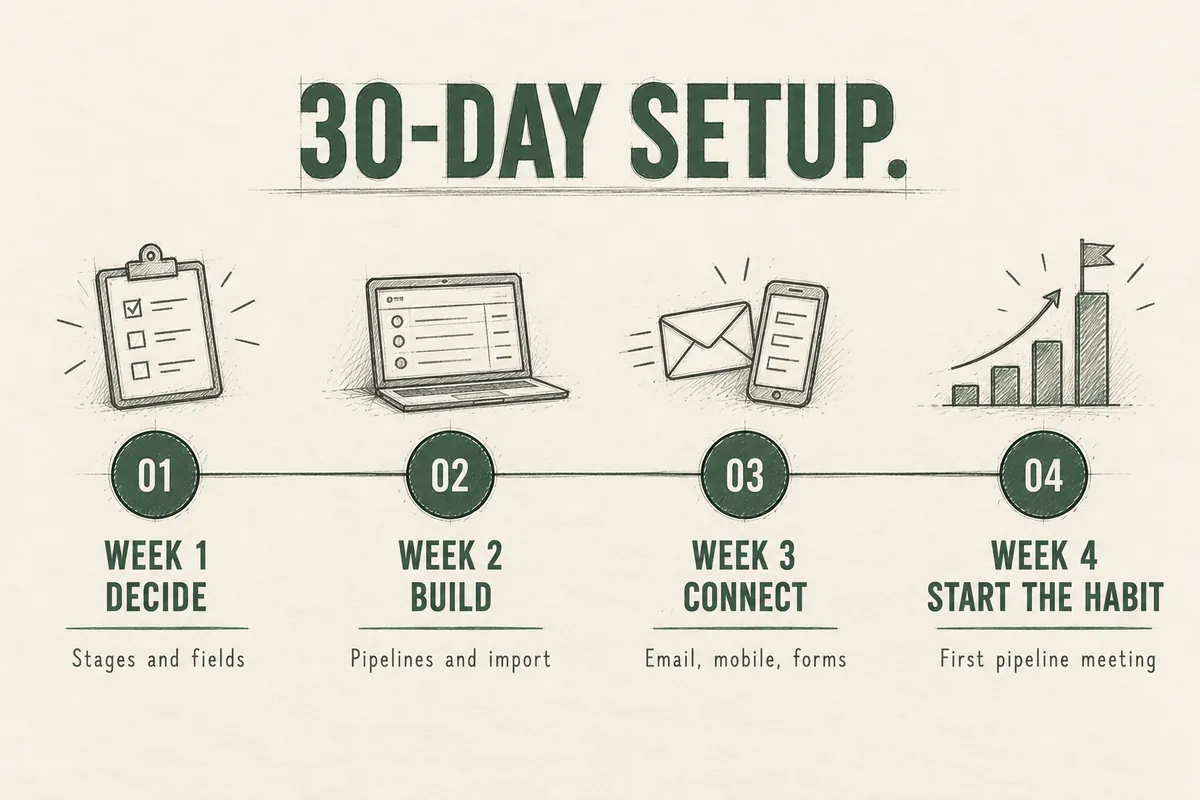
A 30-day setup plan
Week 1: Decide before you build. List what HubSpot will and won’t be used for, and which integrations you need. Write down your stages on paper. Agree on what moves a deal from one stage to the next. Pick your required fields. This is an hour with the owner, the lead estimator, and whoever does BD.
Week 2: Build and import. Create the pipelines and fields. Clean your contact list before you import it (dedupe, fix company names, tag company type). Bring in active pursuits and the last 12 to 24 months of bids with outcomes, so your hit-rate reports have history from day one.
Week 3: Connect the tools. Email extension for everyone, mobile app, website forms pointed into HubSpot, a reminder task tied to bid due dates.
Week 4: Start the habit. Hold the first pipeline meeting from the board. Fix what feels clunky. Cut any field nobody filled in.
Use AI to do the heavy lifting
A lot of that 30 days used to be tedious clicking and spreadsheet cleanup. It doesn’t have to be anymore. AI assistants that can work inside your browser and files, like Claude’s Cowork, can take on much of the build. We’ve used it on our own HubSpot.
Where it helps most:
- Cleaning your contact list before import. Deduping, fixing company names, splitting first and last names, tagging company type. Hours of spreadsheet work become minutes.
- Building the structure. Describe your stages and fields in plain language and have it create the pipelines and custom fields for you.
- Pulling contacts out of where they’re hiding. Old bid logs, sent email, calendar invites, and the spreadsheet your estimator keeps.
- Drafting the pieces around it. Follow-up email templates, a one-page “how we use the CRM” guide for your team, saved report definitions.
What it doesn’t replace is the Week 1 thinking. It can build whatever you describe, so the decisions about stages, required fields, and what HubSpot is for still have to come from you. Review what it builds before you import anything, and keep a backup of your original contact list.
Frequently asked questions
Is HubSpot a good CRM for construction companies?
Yes, for the sales and relationship side of the business. It’s easy to use, affordable to start, and flexible enough to match how contractors win work. It needs to be configured for construction, and it does not replace estimating, project management, or accounting software.
What are the best alternatives to HubSpot for construction?
For commercial contractors who want construction logic built in, look at ProjectMark and Unanet CRM. For a simpler general CRM, Pipedrive. For high-volume inbound leads with text follow-up, GoHighLevel. For residential builders who want CRM and project management together, Buildertrend or JobTread.
Does HubSpot integrate with Procore?
Not through a connector built by HubSpot. Third-party connectors and automation tools like Zapier can create a Procore project when a HubSpot deal is won and keep contacts and companies in sync. Budget for that separately.
How much does HubSpot cost for a contractor?
Most small and mid-size contractors can run on Starter, roughly $10 to $20 per user per month. Professional runs about $90 to $100 per user per month plus a one-time onboarding fee. Confirm current pricing with HubSpot before you buy.
Can HubSpot track bids?
Yes. Each bid or pursuit is a deal, with custom fields for bid due date, project type, estimated value, delivery method, and loss reason. With clean data you can report hit rate by client, market, and estimator.
Do we have to switch CRMs if we already have one?
Usually not. If the current system can hold your stages and fields and your team will open it, fix the setup first. Switching makes sense when the tool itself is the obstacle.
Where to go from here
If HubSpot fits and you want to build it yourself, the 30-day plan above is enough to get a working system. If you’d rather have someone set it up around how your company wins work, or you want help deciding between HubSpot and one of the alternatives, that’s what our construction CRM consulting is for.