

You already know people look you up before they call. A homeowner checks your reviews before they let you in the house. An owner’s rep checks your project list before they put you on a bid list. The question isn’t whether search matters. It’s what to do about it with a crew to run and no marketing department.
So this covers the questions contractors actually ask about SEO. What do I fix first? Is Google Business Profile enough? How do I get reviews without breaking any rules? Do I need city pages? What does an SEO agency cost, and how long before it works? And now that customers ask ChatGPT for a contractor recommendation, how do I show up there?
You’ll walk away with a ranked to-do list you can start this week, real numbers on cost, a straight answer on timing, and a separate section for commercial GCs and subs, because the way an owner finds a commercial contractor is not the way a homeowner finds a roofer. If you’re booked solid on referrals for the next two years, you may decide SEO can wait. That’s a fine answer too.
Key takeaways
- Your Google Business Profile and your reviews do more for local rankings than anything else you can fix this month.
- One page per service, and one page per real service area, almost always beats one long “Services” page.
- Project pages with real scope, location and photos are the most underused asset contractors have.
- AI tools like ChatGPT and Google’s AI Overviews recommend companies they can find specific, consistent facts about across the web.
- Commercial terms get far fewer searches but are far easier to rank for. “Commercial general contractor” has an SEO difficulty of 12. “General contractor near me” sits at 61.
How people find a contractor on Google now
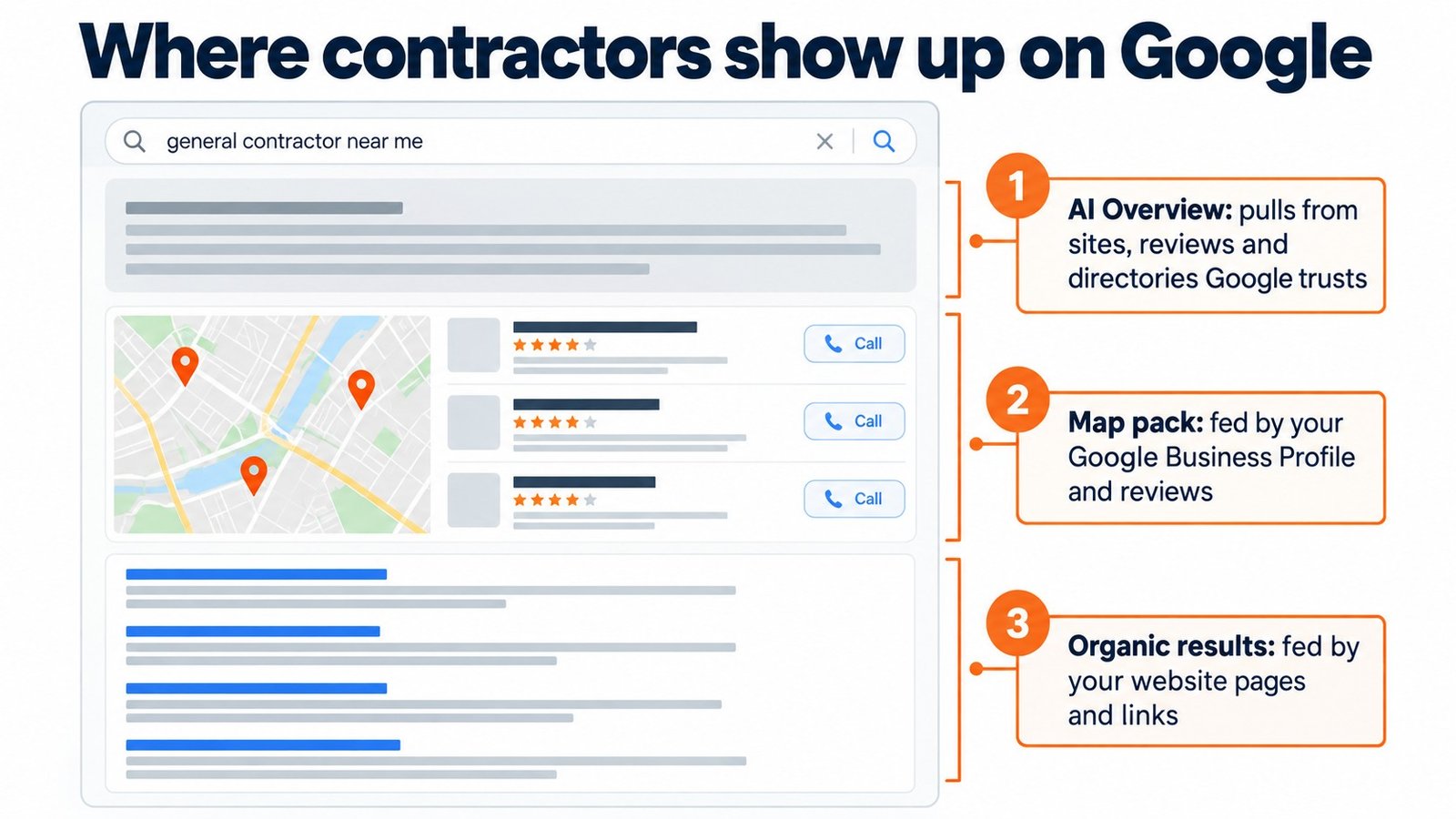
A search for a contractor today usually shows three things before anyone scrolls:
- The map pack. Three local businesses with stars, hours and a call button. This comes from Google Business Profile, not your website.
- The AI Overview. A written answer Google generates, often naming a few companies or pointing to the sources it pulled from.
- Organic results. The ten blue links, where your website, directories and lead sites compete.
Here’s why this is worth your time. These are Ubersuggest’s US estimates for a few common contractor searches:
| Search | Monthly searches | What a click costs in Google Ads | SEO difficulty (0 to 100) |
|---|---|---|---|
| general contractor near me | 74,000 | $9.49 | 61 |
| roofing contractor near me | 74,000 | $23.68 | 62 |
| kitchen remodeling contractors | 33,100 | $23.27 | 63 |
| commercial general contractor | 5,400 | $7.49 | 12 |
Every one of those clicks is something a competitor is paying for in Google Ads. A roofer who ranks organically for “roofing contractor near me” in their market is getting a $20+ click for free, every time. That’s the business case for SEO in one line.
Step 1: Get your Google Business Profile right
If you only do one thing on this list, do this. Your Business Profile is what shows in the map pack, and for “near me” searches the map pack is where most of the calls happen.
Checklist:
- Primary category. Pick the most specific category that matches your main revenue, like “Roofing contractor” or “General contractor,” then add secondary categories for the other work you do. Your primary category matters more than anything you write in the description.
- Service areas. List the towns and counties you actually work in. Don’t list 60 cities to look bigger.
- Services. Add each service with a sentence describing it.
- Photos. Real job photos, real trucks, real crew. Add new ones every month. Stock photos do very little.
- Posts. A short post when you finish a job: what it was, where, one photo. It takes five minutes.
- Q&A. Seed it with the questions you get on every estimate call and answer them.
- Name, address, phone. Exactly the same everywhere: your site, your profile, every directory. Mismatches confuse Google about which listing is you.
Step 2: Reviews, and how to ask without breaking the rules
Reviews move rankings and they move the customer. Most contractors have happy clients and almost no reviews, because nobody asks at the right moment.
The right moment is closeout, while the client is still looking at finished work. Text, not email:
“Hi [Name], it was great working on your [project]. If you were happy with how it turned out, would you mind leaving us a quick Google review? It really helps a small company like ours. Here’s the link: [link]”
Now the question that trips people up: can you offer a discount or a gift card for a review? For Google reviews, no. Google’s review policy says businesses can’t offer payment, discounts, free goods or services in exchange for posting any review. Break it and Google can remove the reviews.
The federal rule is narrower, which is why you’ll read conflicting advice online. The FTC’s rule on consumer reviews, in effect since October 2024, bans offering anything for a review that has to be positive. “Leave us five stars and get $50 off” is out, even if you only imply it. An incentive for an honest review isn’t banned by that rule, but it has to be disclosed. In practice that doesn’t help you on Google, because Google bans incentives either way. So ask, make it easy, and follow up once.
Respond to every review, good and bad. A calm, specific reply to a one-star review often does more for the next customer than ten five-star reviews do.
Step 3: One page per service, and one page per real service area
The most common contractor website has a single “Services” page listing everything. Google can’t tell what you want to rank for, and neither can the customer.
Instead:
- One page per service. Roof replacement. Roof repair. Commercial roofing. Each with its own scope, process, photos and FAQ.
- One page per real service area. Only where you actually work and have something specific to say: jobs you’ve done there, local permitting notes, the neighborhoods or business districts you cover.
Use a simple title formula: Service in City | Company Name. “Roof Replacement in Plano, TX | Smith Roofing.”
What not to do: copy one page fifty times and swap the city name. Google’s spam policies call this doorway abuse, and one of its examples is “having multiple domain names or pages targeted at specific regions or cities that funnel users to one page.” If you can’t write something true and specific about a town, you don’t need a page for it.
Step 4: Project pages are your best SEO asset
Every finished job is a page you could have. Most contractors post three photos in a gallery and move on.
A project page that ranks and sells has:
- A specific title. “Two-Story Addition in Westfield, NJ” beats “Project 14.”
- Scope. What you built, square footage, the main trades involved.
- Location. Town, and neighborhood or business district if it’s useful.
- The problem. What the client needed and what made it tricky.
- Photos. Before, during and after.
- A quote from the client, with their name if they’ll allow it.
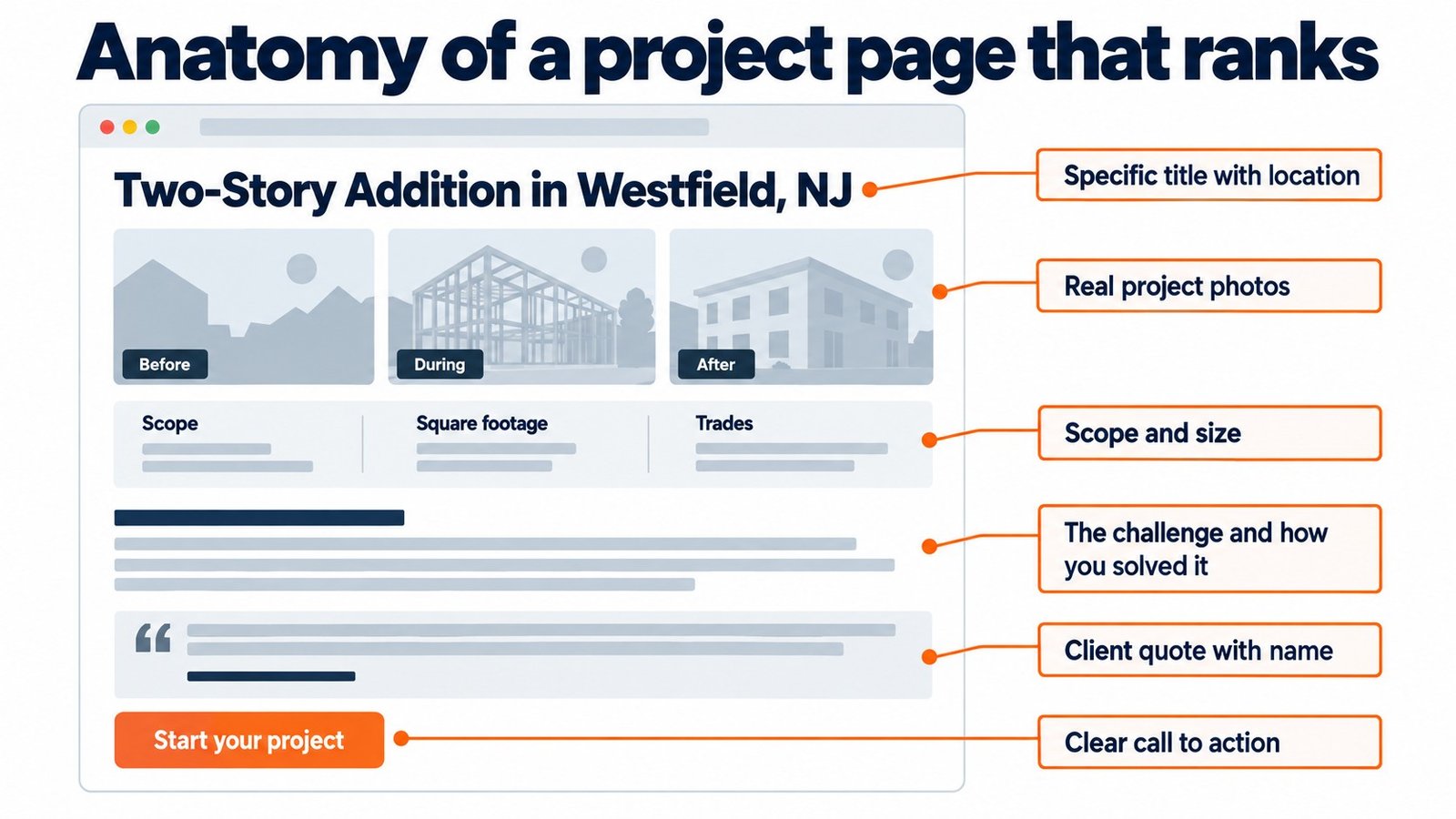
These pages pull in long-tail searches (“garage conversion Westfield NJ”) that your service pages never will, and they’re exactly what a customer wants to see before they call.
Step 5: Technical basics you can check in 10 minutes
You don’t need to be technical. You need to check five things:
- Speed on a phone. Run your homepage through Google’s free PageSpeed Insights. It reports Google’s three Core Web Vitals: how fast the main content shows up (Largest Contentful Paint, aim for 2.5 seconds or less), how fast the page reacts when someone taps (Interaction to Next Paint, 200 milliseconds or less), and whether things jump around while it loads (Cumulative Layout Shift, 0.1 or less). If an older guide tells you to check “First Input Delay,” it’s out of date. Google replaced it with INP in 2024.
- Mobile. Open your site on your phone. Can you tap the phone number? Can you read it without zooming?
- Image size. Big project photos straight off a phone are the most common reason contractor sites are slow. Compress them.
- One clear title per page. Every page should have one H1 and a meta title that says what’s on it.
- Your sitemap. Make sure new pages actually show up in it. It’s a common miss after a plugin or settings change, and it slows down how fast Google finds your new pages.
For a fuller walkthrough of what a contractor site needs, see our guide to building a construction website.
Step 6: Links and listings contractors can actually get
Links from other websites still matter. Forget buying them. You already have relationships that can give you real ones:
- Suppliers and manufacturers. Many have “find a certified installer” or dealer pages.
- Trade associations. Member directories at your local builders association, AGC, ABC or trade-specific groups.
- Local news. A finished school, clinic or community project is a story. Send the local paper or business journal photos and a short write-up.
- Sponsorships. Little league, charity events, chamber events. Most list sponsors with a link.
- Partners. The GCs you sub for, the subs you hire, the architects you work with. Ask to be listed.
- Directories. Your Better Business Bureau listing, Yelp, Houzz, Angi if you use them, and industry directories. Keep the name, address and phone identical on all of them.
Step 7: Content that brings searchers to you
Blog posts work for contractors when they answer the questions your customers type into Google before they’re ready to call. Ten that work for most trades:
- How much does [your service] cost in [your area]?
- How long does [project type] take?
- Do I need a permit for [project] in [city]?
- [Material A] vs [Material B]: which lasts longer?
- What to ask a contractor before you hire them
- Signs you need [repair] vs [replacement]
- What happens during a [project type], week by week
- How to budget for [project type]
- Common mistakes on [project type] and how to avoid them
- What a good [trade] warranty should cover
Write them with real numbers from your own jobs. A cost post that says “most of our kitchen remodels in Bergen County land between $X and $Y, and here’s what moves the number” beats a generic national average.
Getting into AI answers: ChatGPT, Gemini and Google AI Overviews
More customers now ask an AI tool to recommend a contractor or explain a project before they search. These tools don’t rank pages the way Google’s blue links do. They pull from sources they trust and name companies they can describe with confidence.
From tracking how AI tools answer questions about our own industry, a few patterns show up again and again:
- Specific facts get repeated. A page that says “we’ve completed 140 commercial roofs across North Texas since 2012” gives an AI something to say. “Quality service you can trust” gives it nothing.
- Direct answers get lifted. A clear two- or three-sentence answer under a question heading is easy for an AI to quote.
- Third-party mentions matter. Being named on a “top contractors in [city]” list, a supplier’s installer page or a local news story tells the AI other sources agree you exist and do good work.
- Consistency matters. If your services, locations and years in business say the same thing on your site, your Business Profile and your directories, the AI is more likely to trust it.
Five steps:
- Add an FAQ section to every service page, written as short direct answers.
- Put hard numbers on your site: years in business, projects completed, square footage, crew size, service area.
- Get listed on credible third-party lists and directories in your market.
- Keep your company facts identical everywhere.
- Ask ChatGPT and Gemini “who are the best [your trade] contractors in [your city]?” once a month and write down who shows up. That’s your scoreboard.
What SEO costs and how long it takes
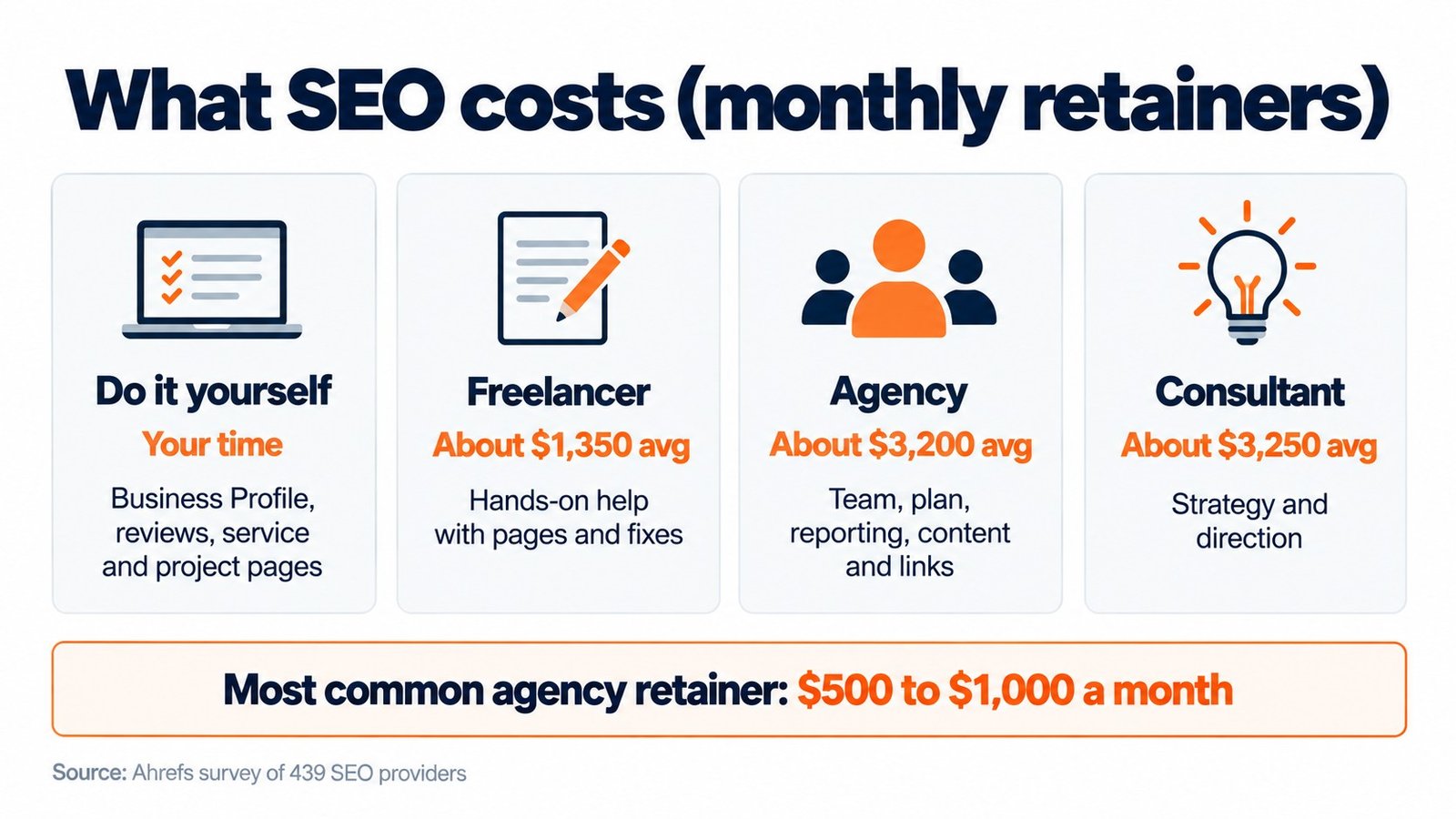
The best public numbers come from an Ahrefs survey of 439 SEO providers (published December 2023, updated 2024). It covers SEO in general, not just construction, but it’s a fair guide to what you’ll be quoted:
| Who does it | What it typically costs | What you get |
|---|---|---|
| You or your office manager | Your time, plus optional tools | Business Profile, reviews, service and project pages |
| Freelancer | About $1,350 a month on average; many charge $500 or less | Hands-on help with pages, content and fixes |
| Agency | About $3,200 a month on average; $500 to $1,000 is the most common retainer | A team, a plan, reporting, content and links |
| Consultant | About $3,250 a month on average; $2,500 to $5,000 is the most common | Strategy and direction, often without the hands-on work |
Across everyone surveyed, the average retainer was $2,917 a month and the average hourly rate was $111.
On timing, there’s no fixed number. Organic rankings for competitive terms usually take months, not weeks, and Google’s own guide to hiring an SEO tells you to ask any provider what results they expect and in what timeframe. Your Business Profile and reviews can move faster, because you’re improving something Google already shows.
SEO for commercial contractors
Everything above applies to commercial GCs and subs too. But the buyer is different, so the playbook shifts.
A homeowner searches once, calls three companies and picks one. An owner, developer or GC finds you through a referral or a bid list, then looks you up to decide whether you belong on the shortlist. The search isn’t “who can do this.” It’s “can this company do this, at this size, without blowing up my schedule.”
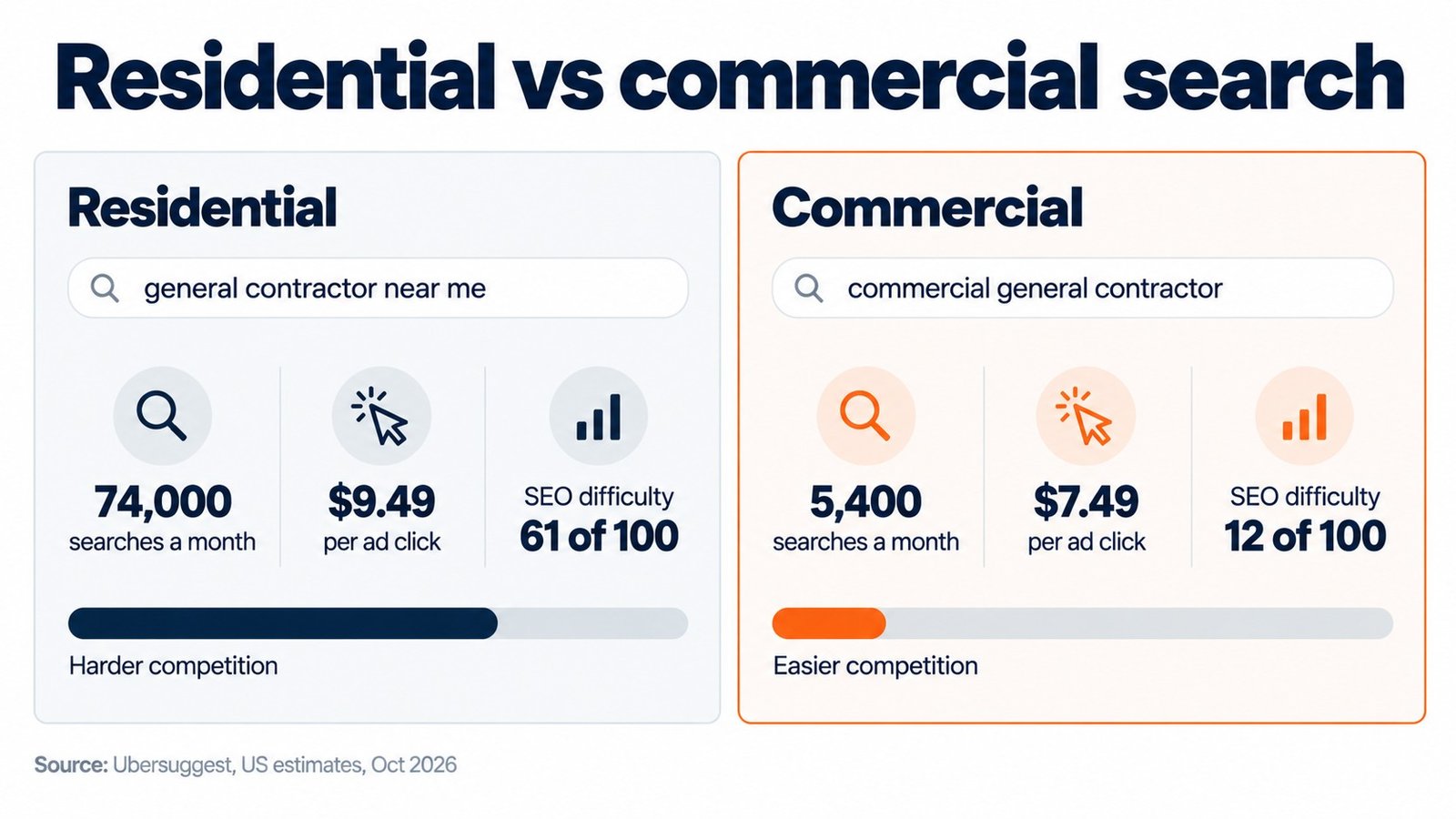
The upside: commercial search terms are far easier to win. “Commercial general contractor” gets about 5,400 searches a month with an SEO difficulty of 12. The residential “near me” terms all sit above 60. Fewer people search commercial terms, but each search is worth more, and far fewer competitors are doing the work to rank.
What a commercial contractor’s site needs to rank and to survive the vetting check:
- Sector pages. Healthcare, industrial, multifamily, retail, tenant improvement. One page each, with projects in that sector.
- Project pages with real numbers. Contract value range, square footage, schedule, delivery method (hard bid, CMAR, design-build), owner or GC name where you’re allowed to share it.
- A prequalification page. EMR, OSHA recordables, bonding capacity, insurance limits, certifications, licenses by state. This is the page an owner’s rep or GC procurement team wants before they invite you, and few contractor sites have one.
- A capability statement download. When we reviewed 20 commercial contractor websites, not one offered a capability statement to download.
- Real people. Names and faces for estimating, precon and leadership, and a person to contact, not just a form.
- Market pages. One page per metro you actively work in, with the projects you’ve done there.
One more lever that matters more in commercial than residential: third-party lists. When an owner’s rep or an AI tool looks for “top commercial general contractors in Phoenix,” they read the lists that rank for that search. Being on those lists, accurately described, does more than another blog post.
Commercial checklist:
- Sector pages for each market you pursue
- At least 10 detailed project pages
- A prequalification and safety page
- A downloadable capability statement
- Named people on the contact and team pages
- Google Business Profile with the commercial categories that fit
- Listings in your local AGC or ABC chapter and the relevant trade directories
- Your firm on the third-party “top contractors” lists for your metros
If you want help building this, that’s what our construction SEO service does for commercial GCs and subs.
Hiring an SEO agency: what to ask
Seven questions:
- Who else in construction do you work with, and can I talk to one of them?
- What will you do in the first 90 days, specifically?
- How will you report results, and which numbers will you show me?
- Who writes the content, and do they understand my trade?
- Do you build links, and how?
- What happens to the content and accounts if we stop working together?
- What’s the contract length and the notice period?
Red flags:
- Guaranteed rankings or “page one in 30 days”
- Link packages (“500 backlinks for $299”)
- No access to your own Google Business Profile, Analytics or Search Console
- Reports full of impressions and nothing about calls or leads
FAQ
How much does SEO cost for a construction company?
In an Ahrefs survey of 439 SEO providers, the average monthly retainer was $2,917, and the most common was $500 to $1,000 a month. Doing it yourself costs mostly time. Most of the work in Steps 1 through 4 is free.
How long does construction SEO take to work?
There’s no fixed number. Organic rankings for competitive terms usually take months, not weeks, so ask any SEO you hire what results they expect and by when. Google Business Profile and review improvements can show results sooner.
Is SEO worth it for a small contractor?
If your phone already rings off the hook from referrals, maybe not yet. If you want more control over the kind of work you get, or you’re paying $10 to $25 a click on ads, it usually is.
Can I do SEO for my construction company myself?
Yes, most of the basics. Your Business Profile, reviews, service pages and project pages are all things an owner or office manager can do. Technical fixes and link building are where outside help earns its fee.
Can I offer customers an incentive for a review?
Not for Google reviews. Google bans incentives for any review, and the FTC bans incentives tied to a positive review. Ask at closeout and make it easy instead.
How do I get my construction company to show up in ChatGPT?
Put specific, consistent facts about your company on your site and your directory listings, answer common questions directly on your service pages, and get named on credible third-party lists in your market.
Does SEO work for commercial contractors?
Yes, and the competition is lighter. Commercial terms get fewer searches but are much easier to rank for, and the pages that rank (project pages, a prequalification page, sector pages) are the same pages owners and GCs check before they invite you to bid.
Want a second set of eyes on your site?
We’ll look at what’s ranking, what’s missing, and what to fix first.